
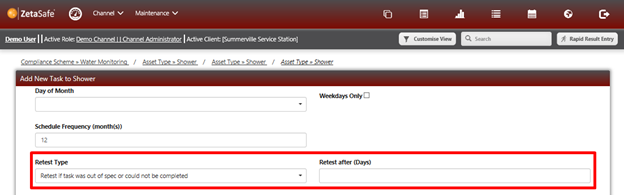
Each task which has a schedule can have some additional configuration to fire ‘extra-curricular’ tasks in the following situations:
- The task was resolved as Unable to Complete
- The task was Out of Specification – so was deemed to be RED according to the task configuration.
Task Types can be set to utilise either or both of these features, or no retest needs to be set at all. They are configured from within the compliance scheme, either when the task is created or edited at a later stage.
Retests cannot be set for tasks with no schedule.
NOTE If a scheduled task exists before, or on the day, that any retest is about to be scheduled the retest will not be cast. It is assumed that as the scheduled visit is before or at the same time, that will be the ‘retest’
Eg. If you have a schedule which exists on a Monday and is every 7 days (every Monday) and you set the retest value to be 14 days after an OOS or Unable to Complete, the retest will never be cast as there will always be a scheduled event within 7 days of the failure.
Comments
0 comments
Please sign in to leave a comment.