
The Master-Worker scheme feature has all the benefits of normal client facing compliance schemes but allows a central point of control, the channel. To utilise this feature you will need to contact your Account Manager.
A Master scheme will be constructed in the channel as normal with asset types, task types and associated schedules. The scheme can then be copied to one or more clients (this will require ZetaSafe intervention), such copied schemes will then be linked to their 'Master'.
Whilst it is possible to import a Master scheme (prior to copying it anywhere), it is not recommended to make updates to the scheme using an import, this may not propagate tasks to workers as expected.
All edits and additions to an existing Master scheme should be done via the web portal, not from an import.
The Master scheme has the following functions:
- Adding new asset/task types to Master (channel) scheme, they will be propagated to all linked Worker (client) schemes
- Editing an asset/task type in the Master scheme, changes will be published to all linked worker schemes
- Deleting an asset/task type in the Master scheme will remove it from the linked worker schemes, however: where an asset type has any assets in any linked clients it will not be possible to delete the asset type. A list of where the assets are, including clientID, client name, barcode and asset type can be copied to clipboard if required.
- Editing the schedule configuration for a task in a Master scheme will propagate changes to the linked worker schemes, where any client has an asset/task which has a scheduled event in the future this task will be rescheduled from the next scheduled event. The system will not schedule a full 18 months for each edited asset/task - the table below describes the minimum number of events will be cast. Once any result is added to the client the schedule will be topped up to 18 months at that point.
| Schedule Frequency | Minimum No of Events | |
| Hours | 24 (or 7 days worth, whichever is greater) | |
| Days | 28 (or 28 days worth, whichever is greater) | |
| Weeks | 26 (or 7 weeks worth, whichever is greater) | |
| Months | 12 (or 1 years worth, whichever is greater) | |
| Years | 3 (or 6 years worth, whichever is greater) |
The Worker scheme has the following functions:
- Linked schemes, asset/task types cannot be edited in the worker scheme
- Linked schemes, asset/task types cannot be deleted from the worker scheme
- Asset/Task types can be added to a worker scheme from the client, these are in addition to the Master scheme and are not copied back/linked to to the Master, they are entirely controlled in client scope and can be added/edited/removed in the same way as in a normal compliance scheme. This is referred to as extending the worker scheme.
- Linked asset/task types can be duplicated in the worker scheme, these tasks will behave as if they were added directly into the worker scheme and are completely manageable from there, they will not be copied back/linked to the Master. This is referred to as extending the worker scheme.
Extending the worker scheme
It is possible to extend a Master scheme within any individual Worker by adding Assets/Tasks specific to the client, these items [only] will be manageable by client users in the same way as the standard client compliance scheme would be. Any such extensions will not be visible within the Master.
Highlighting a compliance scheme will show the clients it is copied to (when viewed from Master) as shown in Fig 1, or the Master it is copied from (when viewed from Worker).
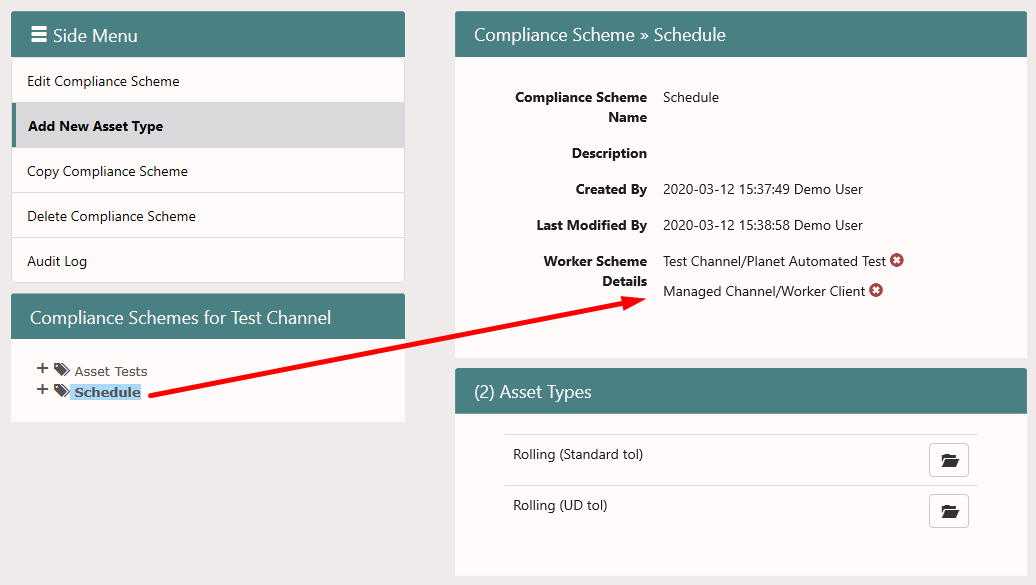
Fig 1 (View from Master scheme)
Comments
0 comments
Article is closed for comments.