
Why?
It is not always appropriate for tasks to be scheduled for 18 months according to a very strict calendar based regime. In some cases it is appropriate to schedule only a single future event based on the date a result was actually taken, rolling schedules are designed to meet this need.
How?
To access the rolling schedule feature you will need to contact your account manager who can arrange to have the feature switched on for your channel/client. Where the feature is switched on via channel, only managed clients directly in that channel will gain access; sub channels (and/or clients there in) will have to be switched on independently.
Unmanaged clients can have this feature switched on individually.
Where?
To begin, set up a task type as normal in the compliance scheme. Select 'Rolling' from the Schedule Frequency drop down (Fig 1).
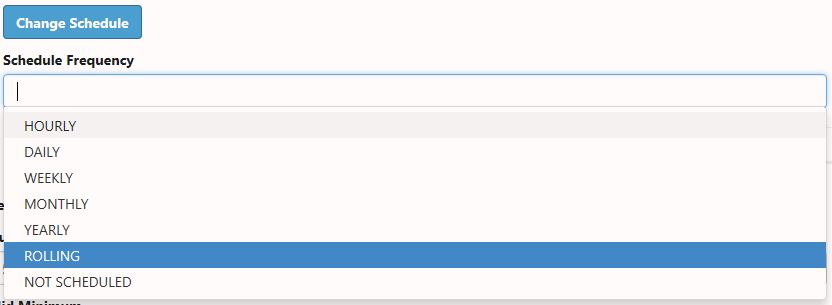
Fig 1
Each scheduled task will still need a configuration and this is done in the same way as a normal schedule, you will select a frequency {Years, Months, Weeks, Days, Hours}. Retests are configured in the same way as normal tasks - the only difference is that retests can have an independent tolerance setting (so the task could have standard tolerance but the retest could have a user defined one, if required).
Fig. 2 shows the configuration page for the schedule, all the items in the red box relate directly to retests, where no retest is required these items will not be displayed.
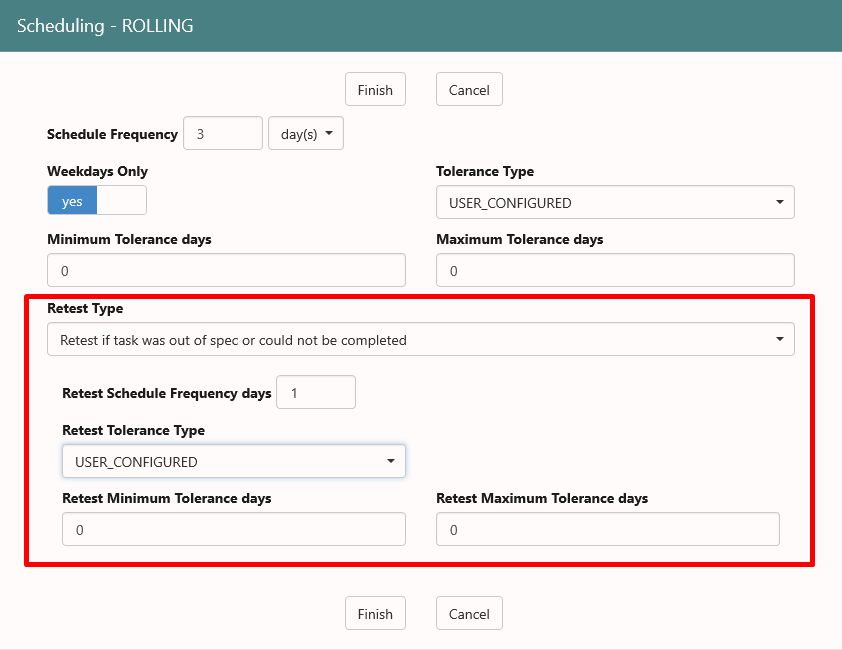
Fig 2
What?
So a rolling schedule will only ever have a maximum of one event scheduled in the future, each event is scheduled from the last Task Completed Date and not from the last scheduled date. Where a scheduled event is missed no further events will be scheduled until:
- A new seed date is set for the asset/task in question.
- A result is entered for the task in the appropriate asset.
This will lead to historic schedules for rolling tasks appearing to be irregular. This is because tasks are very unlikely to be completed on the actual due date. Before contacting support about such irregularities please make sure that you have taken this into account.
Comments
0 comments
Article is closed for comments.