
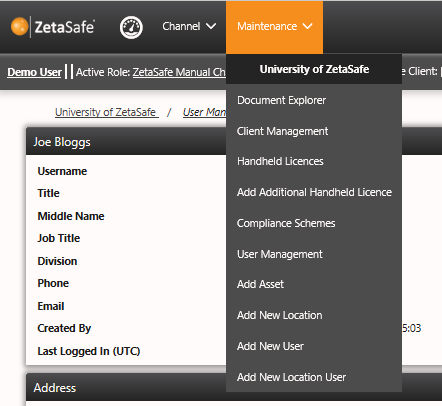
The maintenance menu is available to all Client users at all times. Other users have access but must be in Client Scope (i.e. have a Client database selected) to access the menu. In addition to the quicklink icons other ‘frequently used’ functions can be found here, such as:
- Document Explorer – View all documents (Location/Asset/Result Note, Location, Client, Asset, Shared Documents)
- Client Management – edit and review of current address, client name etc.
- Handheld Licences – View available and in use handheld licences
- Add Additional Handheld Licence - Allow another channel/client user outside of your scope to access your database using ZetaMobile
- Compliance Scheme Repository – schemes & asset types from which assets can be created
- User Management - List of all client users and associated mgmt. functions
- Add Asset – Add a new asset to the selected client
- Add New Location – Add a new location to the selected client
- Add New User – Add a new client type user
- Add New Location User – Add a new Location type user within the current client
Comments
0 comments
Please sign in to leave a comment.