
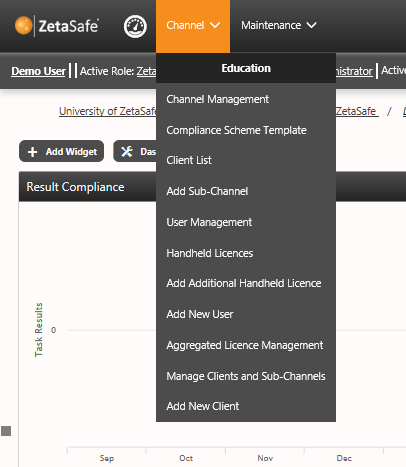
The channel menu is specific to users who can access channels, i.e. all users except Client and Location User types. Frequently used functions can be found in this menu, such as:
- Channel Management – edit and review of current address, channel name etc.
- Compliance Scheme Template Repository – build one compliance scheme and copy it to your clients
- Client List – List of all clients within the channel with licence information, links on this list enable channel users to hop between clients without needing to use ‘change active view’
- Client List – List of all clients beneath this channel
- Add Sub-Channel - Not switched on by default, allows aggregated channel admins to create their own sub channels
- User Management – List of all channel users and associated mgmt. functions
- Handheld Licences – View available and in use handheld licences
- Add Additional Handheld Licence – Allow another channel/client user outside of your scope to access your database using ZetaMobile
- Add New User – Add a new channel type user
- Aggregated Licence Management – Not switched on by default, allows aggregated channel admins to manage licences between clients more fluidly. Speak to your Account Manager for more details.
- Manage Clients and Sub Channels – Unmanaged channels and clients are not shown to Channel Users, improving efficiency and providing clarity for users, both on the web and on the handheld devices.
- Add New Client – Add a new client to the selected channel
Comments
0 comments
Please sign in to leave a comment.