
Viewing Documents
Documents can be viewed from within channel or client scope. Documents stored within a channel are visible from the channel management screen, documents stored within the client can be viewed from either the client mgmt. screen or from the Document Explorer accessed from the Maintenance menu.
It is from these lists that documents can have certain elements edited, they can be downloaded or deleted from the system.
Documents lists are visible in the following areas:
- Channel Mgmt
- Client Mgmt (client documents and any which have been shared from the parent channel)
- Document Explorer (all documents visible here)
- Locations
- Assets
- Result Notes
- Asset Notes
- Location Notes
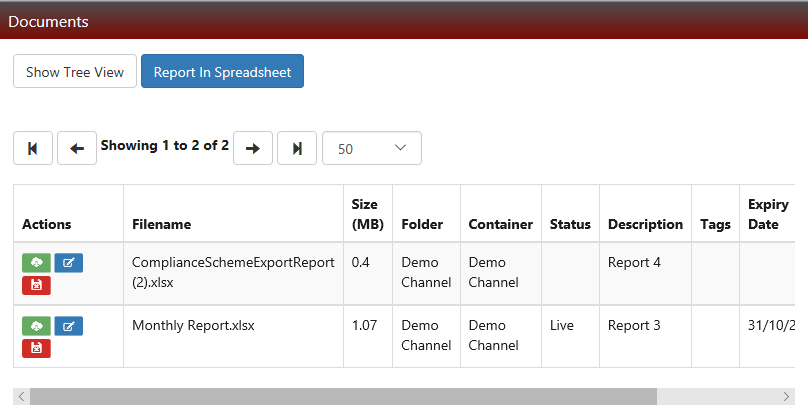
Documents shown in list view have three 'quick links':
- GREEN - Download
- BLUE - Edit
- RED - Delete
Editing Document Attributes
It is possible to edit certain attributes (see Figure 13) of a document but not the document itself. To edit an actual document stored within ZetaSafe you will need to ensure you have the appropriate software (e.g. Word, Excel, Open Office), download it, edit and the re-upload the document. It is possible to overwrite an existing document when uploading to retain your version control.
Note that clicking on a document link from the Documents widget will show not allow any user to edit the properties, only view them.
Comments
0 comments
Please sign in to leave a comment.