
ZetaSafe includes a set of channel and client standard reports. While all lists can still be exported, it is done through the report section of the system now.
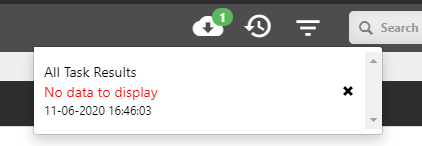
Reports are run in the background so you can continue working on other areas of the website at the same time. When the report is complete a downloadable link will appear in the notification bar. If multiple reports are requested then a 'download all' button is also provided. Where the report is empty a close [x] button allows you to clear it and retry with different filter parameters if desired.
If you experience issues downloading reports note that some browser will require you to enable popups.
To set up an automatic report:
- Navigate to the Report section, (a bullet-pointed list in a box icon) in the top right part of the screen.
- Choose which report you want to schedule and click on it.
- Next to the Run button at the top, under Options, select Schedule.
- You can name it describe it and choose how often you want to schedule it, using the recurrence section.
- Select Finish and your reports are scheduled.
- To view Schedules, click Schedules under Options, next to Run and Schedule.
Comments
0 comments
Please sign in to leave a comment.